
SketchUp 2027 is here, bringing a new generation of tools and improvements designed to make 3D modelling more flexible, efficient and intuitive.
Whether you’re an architect developing detailed building designs, an interior designer exploring creative concepts or a construction professional producing technical documentation, the latest SketchUp release introduces some exciting opportunities to improve your workflow.
From new procedural modelling tools to enhanced documentation capabilities in LayOut, SketchUp 2027 focuses on helping designers spend less time rebuilding models and more time developing their ideas.
At Elmtec, a UK Gold Reseller of SketchUp, we’re taking a closer look at what’s new and what these updates mean for design professionals.
1. Introducing SketchUp Procedures, A Smarter Way to Model
One of the biggest additions to SketchUp 2027 is the introduction of SketchUp Procedures.
Traditionally, making changes to complex geometry could mean repeating modelling steps or rebuilding sections of a design.
SketchUp Procedures introduces a more flexible approach through non-destructive modelling.
This means designers can adjust the original inputs of procedural components without having to recreate the resulting geometry.
The new tools include:
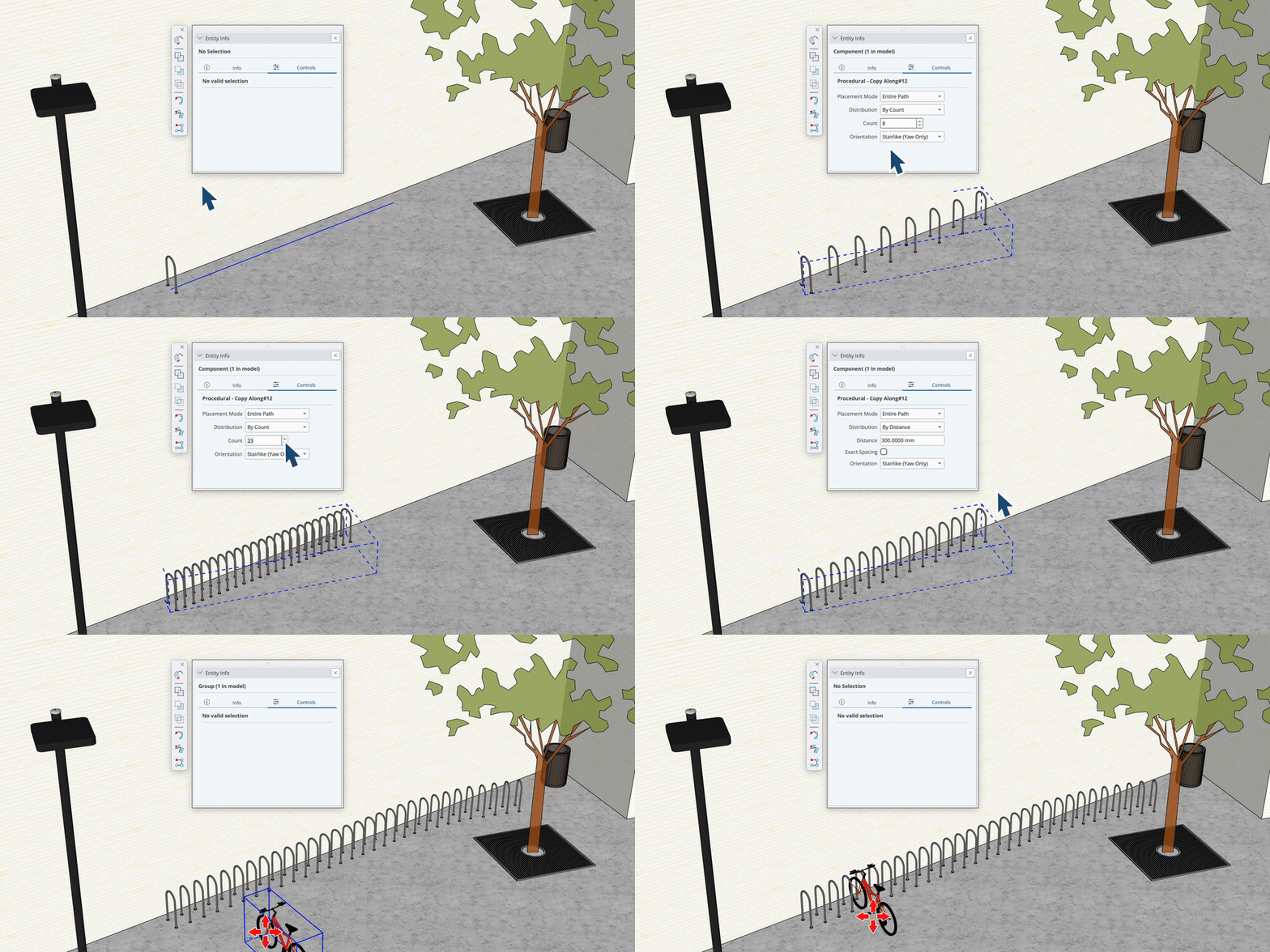
Copy Along
Create repeated components along a path, with the flexibility to adjust spacing, geometry and the original path.
This could be particularly useful when designing railings, fences, architectural details or repeated interior elements.
Enhanced Follow Me
The familiar Follow Me tool has been updated with procedural capabilities, allowing users to modify extrusion inputs more easily.
Improved Solid Tools
Selected Solid Tools now support procedural components, giving designers more flexibility when working with complex shapes and assemblies.
Why does this matter?
Design changes are part of almost every project.
Being able to adjust geometry without rebuilding entire sections of a model could help reduce repetitive work, particularly when exploring different design options.
2. New Section Fill Hatches for More Detailed Drawings
SketchUp 2027 introduces Section Fill Hatch Patterns, giving users more control over how materials and building elements are represented in section drawings.
Previously, users had more limited options when displaying section fills directly within SketchUp.
With the latest update, designers can apply hatch patterns to section cuts, helping communicate different materials and construction details more clearly.
This is particularly valuable for architects and construction professionals who need to produce detailed drawings that communicate design intent.
The new Hatch Patterns panel also makes it easier to manage and customise patterns within a model.
3. AutoFit Live Components, Making Design Changes Easier
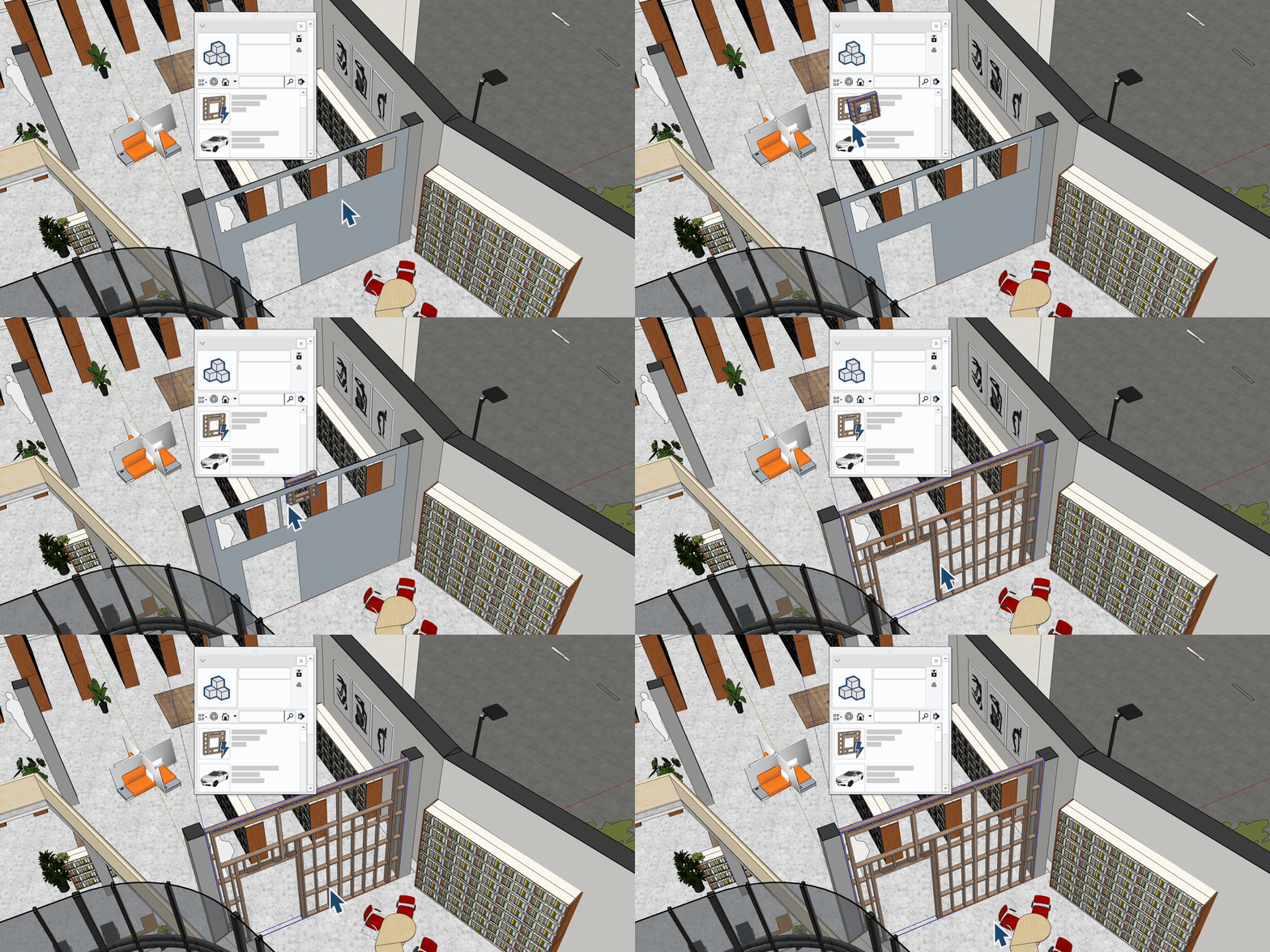
Another useful addition is AutoFit for Live Components.
This feature allows compatible Live Components to automatically configure themselves when placed onto a face within a SketchUp model.
For example, rather than manually adjusting a component to suit a particular surface, AutoFit can help streamline the placement process.
For designers working with configurable elements, this offers another way to reduce repetitive modelling tasks and make design development more efficient.
4. Faster, More Flexible Documentation with LayOut
For professionals who rely on LayOut to produce drawings and presentations, SketchUp 2027 introduces several improvements.
Improved Hidden Line Rendering
An updated rendering engine is designed to improve the speed of generating vector linework from complex models.
This could make a noticeable difference when producing detailed architectural drawings or working with larger projects.
Image Adjustments
Users can now adjust images and SketchUp viewport appearances directly within LayOut, reducing the need to switch between different applications for certain visual changes.
Paperless Drawing
The new paperless drawing functionality gives users more freedom to work on scaled drawings without being restricted by traditional page boundaries during the drafting process.
Together, these improvements aim to make the transition from 3D design to professional documentation more efficient.
5. Improved Compatibility with Other Design Software
Collaboration is an essential part of modern design projects.
Architects, engineers, contractors and designers frequently work across different software platforms, making file compatibility an important consideration.
SketchUp 2027 introduces several interoperability improvements, including:
-
Additional controls for DWG and DXF imports and exports.
-
Enhanced IFC workflows.
-
Improvements to TrimBIM and IFC compatibility.
-
Updated support for USD workflows.
These changes are designed to make it easier to exchange design information and integrate SketchUp into wider project workflows.
For practices working with multiple consultants and software platforms, improved interoperability can help reduce friction when sharing project information.
6. A More Consistent Experience Across Windows and Mac
SketchUp 2027 also introduces a unified interface across Windows and macOS.
The update brings greater consistency to the way users interact with SketchUp and LayOut, including workspace customisation and toolbar management.
Another useful improvement is multiple document management.
Users can now work with multiple open models within a single instance of SketchUp, using tabs and floating windows.
For professionals regularly switching between projects or comparing design options, this could make everyday modelling more convenient.
What Does SketchUp 2027 Mean for Architects and Interior Designers?
While each new feature offers individual benefits, the wider focus of SketchUp 2027 is clear.
More flexibility, less repetitive work and greater control over the design process.
For architects, the introduction of procedural modelling and section hatches offers new opportunities to develop detailed designs and communicate technical information.
For interior designers, improvements to component placement and modelling flexibility can help make it easier to explore different layouts and design options.
For larger design teams, improved file compatibility and documentation workflows could support more efficient collaboration.
Ultimately, SketchUp 2027 is about giving designers more freedom to experiment, refine and communicate their ideas.
Ready to Explore SketchUp 2027?
Whether you’re already using SketchUp Pro or Studio, or considering introducing SketchUp into your design workflow, the latest release offers plenty to explore.
At Elmtec, we’re proud to support architects, interior designers and creative professionals across the UK with SketchUp solutions.
Our team can help you explore the latest features, understand your licensing options and find the right SketchUp solution for your business.
Already a SketchUp customer?
Discover what’s new in SketchUp 2027 and explore how the latest improvements could benefit your projects.
New to SketchUp?
Get in touch with our team to learn more about SketchUp Pro and Studio, or start exploring with a free trial.
Ready to take your designs further?
👉 Contact Elmtec today to discover SketchUp 2027 and find the right solution for your workflow.